Fix the rules your new model keeps misreading.
It audits your CLAUDE.md or a skill file line by line, sorts every instruction into a bucket, and rewrites the ones written for older models. You approve a review table before it changes a single line.
Built by Atharva Shah. Rule Rewriter costs $19, paid once. Buy Rule Rewriter. The skill folder and setup guide arrive by email.
Rule Rewriter at a glance
Rule Rewriter is an AI agent skill for Claude Code, Codex CLI, Gemini CLI, and other agents that read SKILL.md. Audits your CLAUDE.md and skill files for rules written for older models, then fixes them. Best for: CLAUDE.md best practices.
- Works with
- Claude Code, Codex CLI, Gemini CLI, Cursor, GitHub Copilot
- Category
- Agents and engineering
- Price
- $19, one payment
- Requirements
- Needs a Claude plan that supports skills. Claude Code works best, because it can read and edit the file for you. It rewrites rule wording and does not shorten or restructure a long file.
- Included
- Seven-bucket audit, Rewrite patterns with examples, Review table before edits, Works on skill files
What Rule Rewriter produces
If you have a CLAUDE.md, you have something to audit.
No setup beyond installing the skill. Every audit runs the same three steps.
- Point it at the file. It reads the CLAUDE.md in your current folder by default, or any skill or instruction file you name.
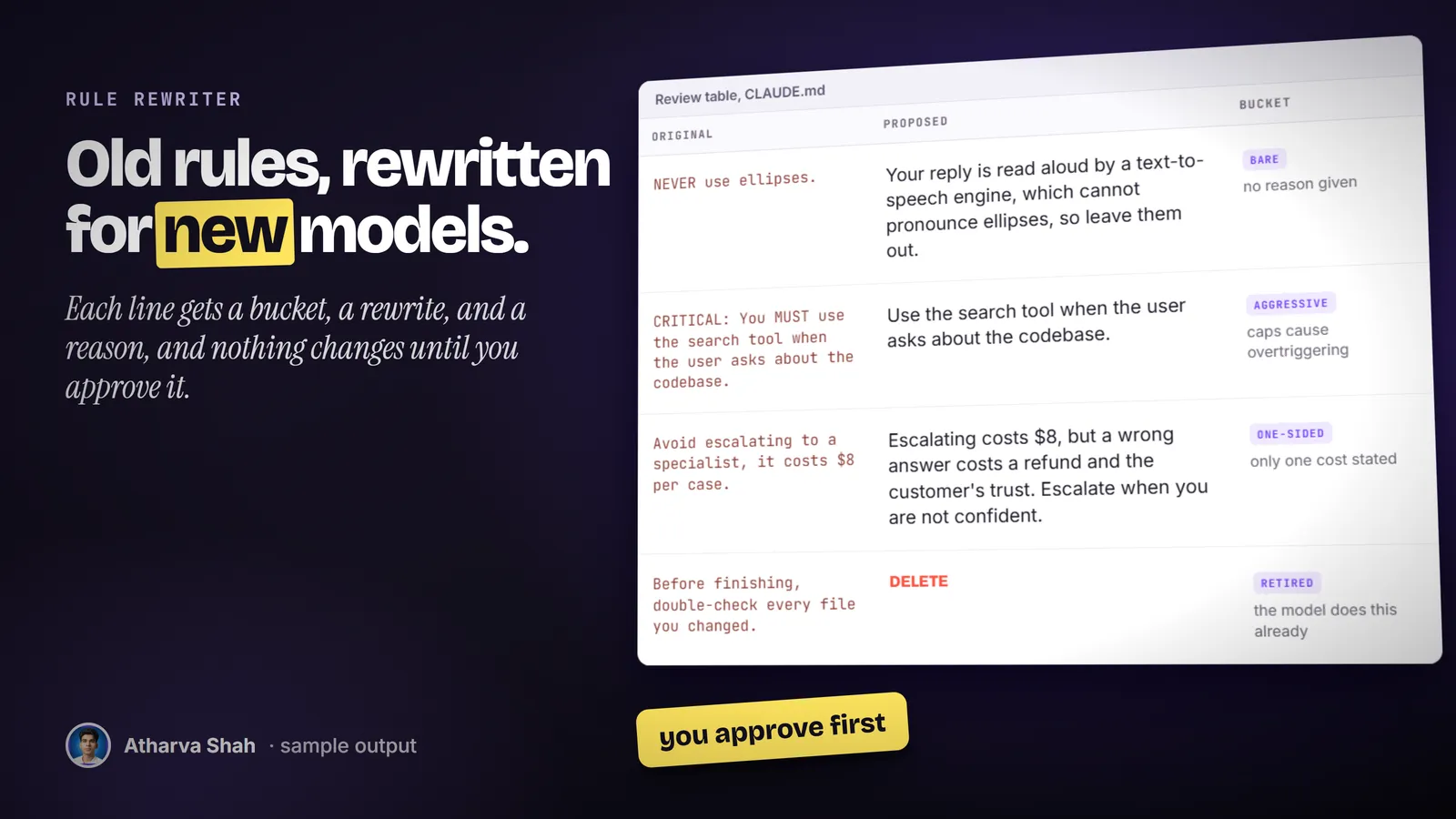
- Read the review table. Every line gets one of seven buckets, a proposed rewrite or a delete, and a one-line reason. Lines it is unsure about get a question mark for you to decide.
- Approve, then it edits. Nothing changes until you say yes. It keeps your voice and your formatting, then edits the file in place.
The usual fixes make the file worse.
Adding more caps makes new models overreact. Deleting at random removes the lines that matter.
Rule Rewriter
- Seven clear buckets. Every line is sorted before anything is rewritten.
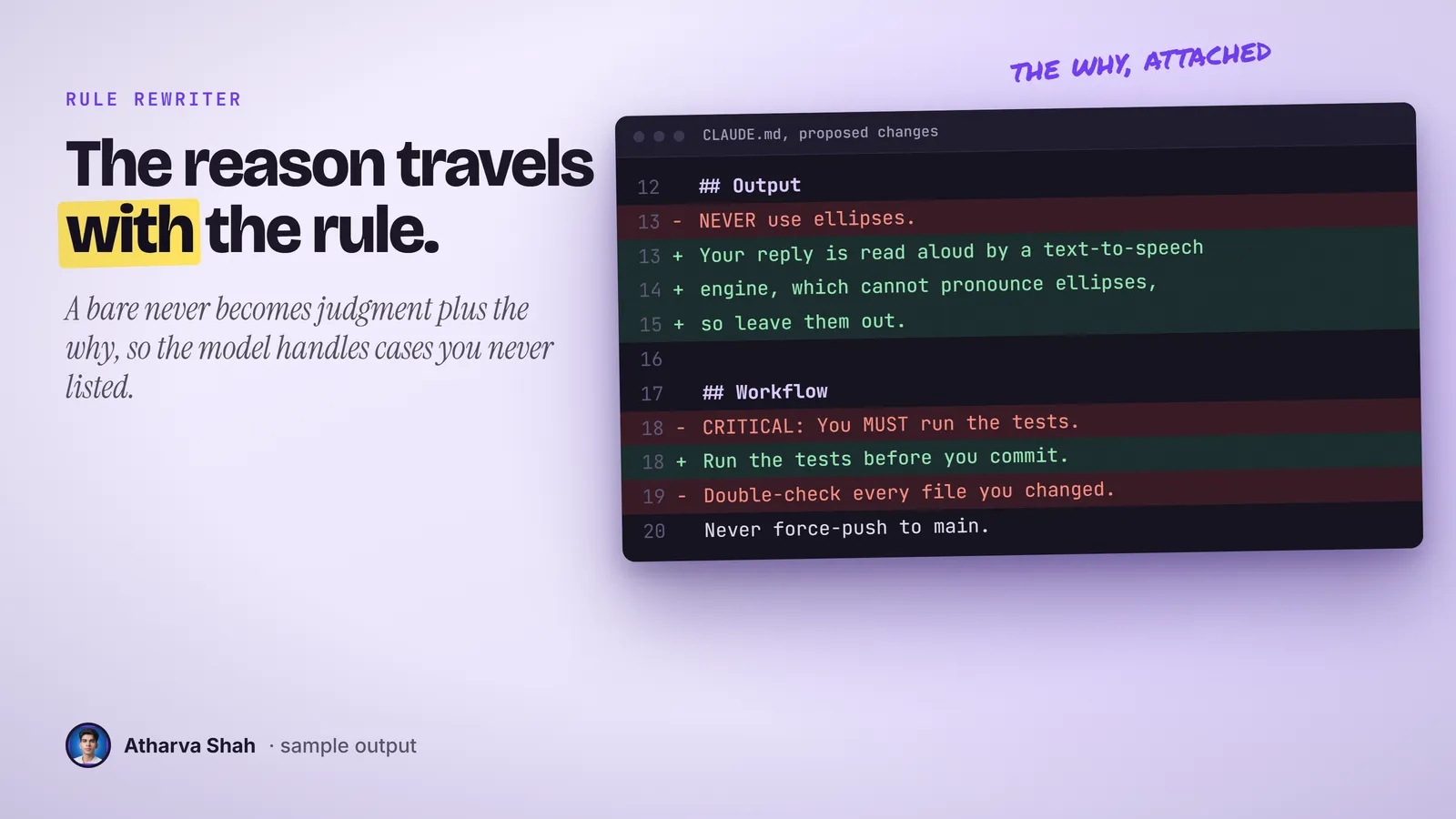
- Reason on every rule. Bare bans become judgment with the why attached.
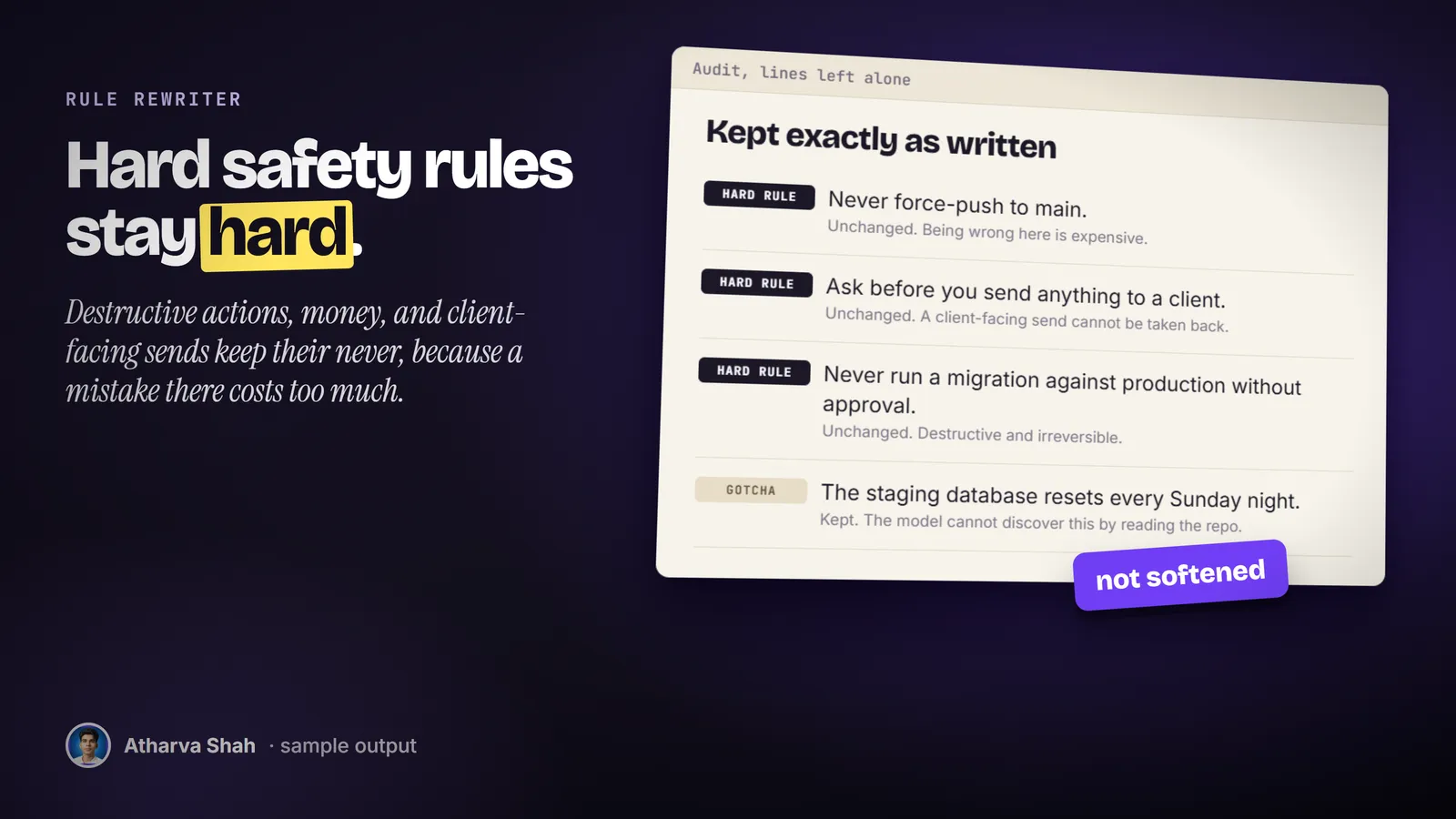
- Hard rules protected. Safety, money, and destructive actions stay strict.
- You approve first. A three-column review comes before any edit.
Rewriting by hand
- Slow reading. You check every line against guidance you half remember.
- Easy to overcut. A project gotcha looks obvious until it breaks a build.
- No pattern. Each fix is worded differently from the last one.
- Skills get skipped. You fix the main file and forget the ten skill files.
Asking a chat to clean it up
- Everything gets softened. Safety rules lose their teeth along with the noise.
- Silent changes. You get a new file with no list of what moved.
- Voice lost. Your file comes back in a stranger's tone.
- No method. Two runs on the same file give two different results.
It keeps your voice and your hard rules.
It changes rule quality and leaves file structure alone. Your headings, your formatting, and your tone stay as they are. The lines it values most are the project facts a model cannot discover alone, so it leaves those untouched and puts its effort into the bans, the caps, and the instructions a current model no longer needs.
Questions about Rule Rewriter
What are CLAUDE.md best practices?
Keep rules short, state the reason next to each one, and delete instructions the current model follows anyway. This skill sorts every line into keep, rewrite, or delete and shows you the result.
Does this work on AGENTS.md files too?
Yes. AGENTS.md and skill files follow the same logic, so the audit and the rewrite work on all three.
Which Claude plan do I need?
Any paid plan that supports skills. Claude Code works best, because the skill reads your file and applies the approved edits directly.
What else do I pay for?
Nothing. It runs on your Claude plan with no other tools.
Will it delete my safety rules?
No. Rules about destructive actions, money, permissions, and messages to clients go into a keep bucket and stay strict.
Does it change anything without asking?
No. It shows a review table of the original line, the proposed line, and the reason. It edits only after you approve.
Why rewrite rules at all?
Current Claude models follow judgment better than bare bans. A rule with its reason generalizes to cases you did not list. All-caps warnings written for older models now make them overreact.
Is this based on anything official?
Yes. The rewrite patterns follow Anthropic's published prompting guidance for current models. The skill links to those pages.
Can it shorten a very long CLAUDE.md?
Only by deleting retired and obvious lines. It does not split or restructure a file. For that, move sections into folder-level instruction files.
Does it work on skill files and other agents?
It works on any skill file or markdown instruction file. The guidance it applies is written for Claude models.
What if I disagree with a rewrite?
Reject that row. Every change is approved line by line, and lines it is unsure about are marked for you to decide.
Does this skill work with Gemini CLI, Codex, Cursor, or GitHub Copilot?
Yes, with one caveat. The skill is a SKILL.md folder in the Agent Skills open standard, which Claude Code, Codex CLI, Gemini CLI, Cursor, and GitHub Copilot all load. It is built and tested on Claude Code. Steps that lean on Claude-only features, such as parallel subagents, run one after another or need a manual step in other agents.
How do I install an agent skill?
Copy the skill folder into your agent's skills directory: ~/.claude/skills for Claude Code, or the skills folder your agent documents for Codex CLI, Gemini CLI, Cursor, or Copilot. The agent reads the description and loads the skill when your request matches it. Each skill ships with a setup guide for any tool it needs.
Related skills
- Hidden API Finder: Finds the real endpoint behind a web app button by reading its JavaScript, read-only.
- Merge Ready: Takes a branch from code that exists to a pull request ready for final review.