Your AI characters keep the same face in every shot.
It locks your character from one reference, then writes outfit sheets, scene plates, and Seedance prompts with a real camera, lens, grade, and in-scene sound.
Built by Atharva Shah. AI Cinema Director costs $49, paid once. Buy AI Cinema Director. The skill folder and setup guide arrive by email.
AI Cinema Director at a glance
AI Cinema Director is an AI agent skill for Claude Code, Codex CLI, Gemini CLI, and other agents that read SKILL.md. Locked character sheets and cinema-grade video prompts for Higgsfield and Seedance. Best for: Seedance prompts.
- Works with
- Claude Code, Codex CLI, Gemini CLI, Cursor, GitHub Copilot
- Category
- Video and film
- Price
- $49, one payment
- Requirements
- Needs a Claude plan that supports skills. The skill writes prompts only. You generate the images and video in Higgsfield, which bills its own credits, and some image models cost more credits than others.
- Included
- Character lock flow, Outfit and six-angle sheets, Five cinema modes, Seedance video prompts
What AI Cinema Director produces
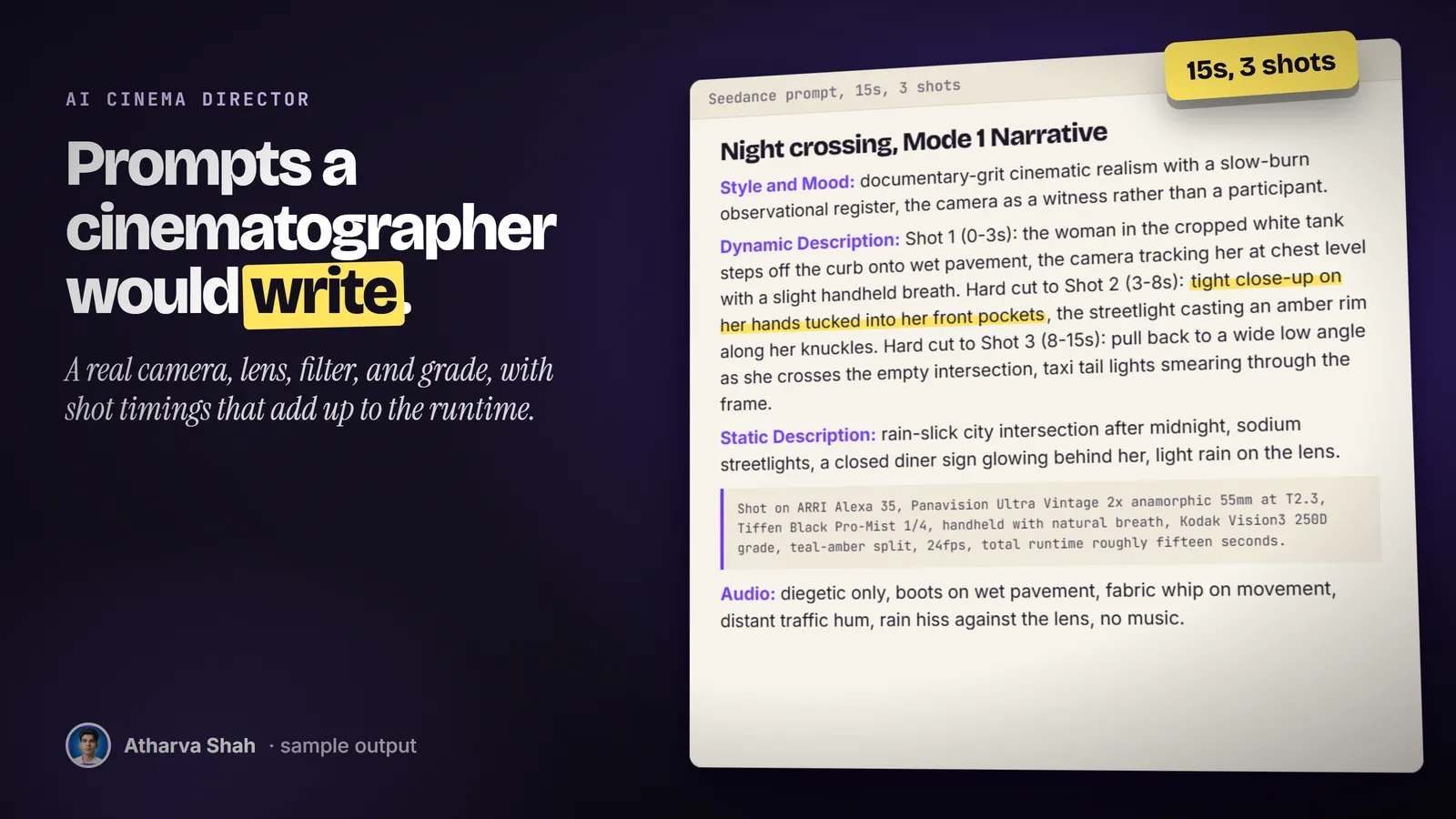
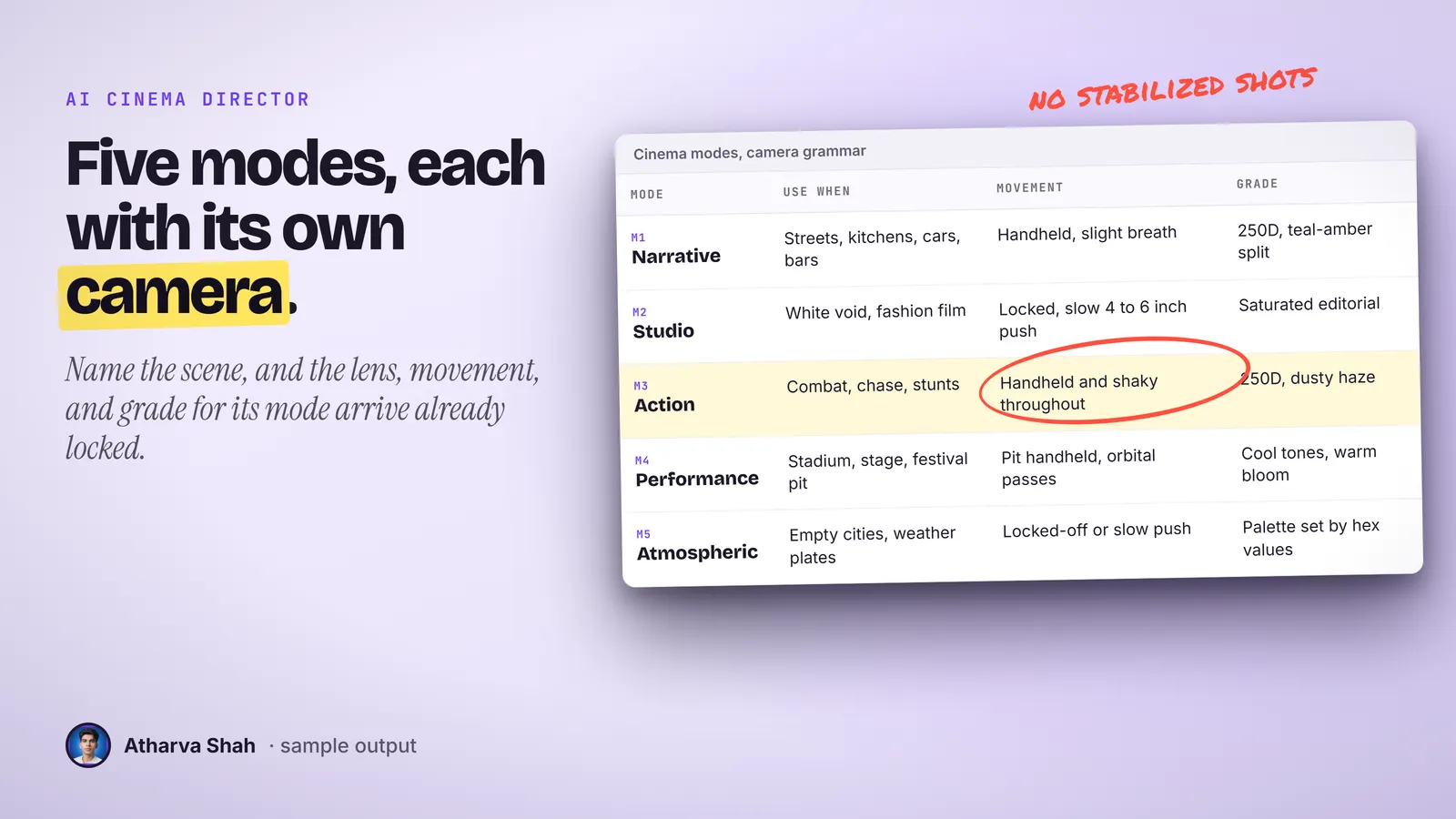
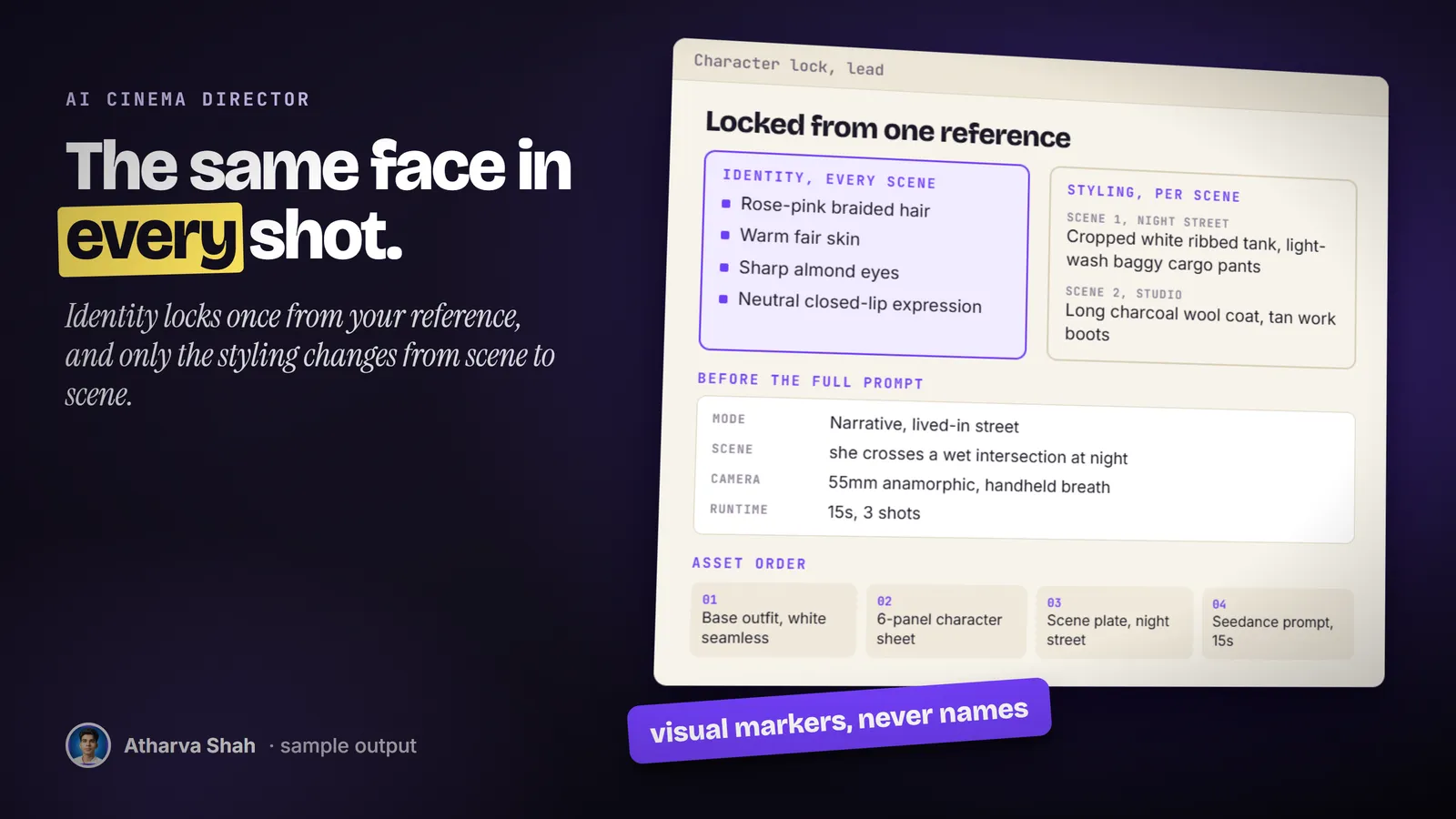
If you can describe the scene, you can direct it.
You set it up once. Every character and every scene goes through the same three steps.
- Lock the character. Upload a reference or describe someone new. It writes back a plain-language spec and waits until you say it is right.
- Build the assets in order. A base outfit on a white studio backdrop comes first, then a six-angle sheet, then scene plates. Each prompt gets a short check before you spend credits.
- Paste the video prompt. It picks one of five cinema modes, sets camera and grade, times every shot, and writes sound from inside the scene. You paste it into Seedance.
The usual options drift or cost a fortune.
Loose prompts change the face every shot. A human crew costs more than the whole project.
AI Cinema Director
- Character locked first. Every prompt restates the same visual spec.
- Real camera grammar. Body, lens, filter, and film grade per mode.
- Sound from the scene. Footsteps, fabric, and rain, never a score.
- Checks before it writes. You approve a short summary before the prompt.
Prompting by feel
- The face drifts. Shot three looks like a cousin of shot one.
- The plastic look. Glossy skin and flat light give the AI away.
- Music in the prompt. Soundtrack words confuse the native audio.
- Credits burn. Every vague prompt costs a full generation.
Hiring a prompt artist
- Paid per scene. The cost grows with every shot you add.
- Their look. You inherit the style of their last project.
- Slow handoffs. One lens change waits for their reply.
- Your references leave. Your character files sit in their inbox.
It directs your cast, shot after shot.
Each character you lock stays locked for the whole session, and each prompt restates their look in full, so the model never has to guess. It never invents a garment you did not show or describe, and it never puts a name, a brand, or an age into the prompt. You bring references and a clear scene, and it brings the camera department.
Questions about AI Cinema Director
How do I write good Seedance prompts?
Name the camera, lens, movement, grade, and the sound inside the scene, and keep the character description identical across shots. This skill writes prompts in that order from one locked reference.
How do I keep the same character across AI video shots?
Lock one reference image first, then reuse its exact identity markers in every prompt. The skill builds the reference sheet before it writes any scene.
Does this generate the images and video?
No. It writes the prompts. You paste them into Higgsfield, attach your reference images there, and Higgsfield generates the result.
Which Claude plan do I need?
Any paid plan that supports skills. It runs in the Claude app or in Claude Code, because it only reads your images and writes text.
What else do I pay for?
Higgsfield credits for every image and video you generate. The skill warns you before it suggests a model that costs more credits.
How does it keep the face the same?
It locks a written spec of the face, hair, skin, and build from your reference, then restates that spec in full in every prompt. You still attach the same reference image in Higgsfield.
What are the five cinema modes?
Narrative for lived-in locations, Studio for fashion and editorial sets, Action for combat and chase, Performance for concerts, and Atmospheric for empty landscapes and establishing shots.
Why no music in the prompt?
Seedance generates sound on its own. Music words confuse it, so the prompt describes only sounds inside the scene. You add your track as a separate audio reference.
Can I use it for music videos?
Yes. Performance mode covers stage and crowd shots, and a sequence can cut between modes, such as a studio set and a street.
Can I use my own face?
Yes, if you upload your own photo as the reference. Only use faces you have the right to use.
What if my first result is not great?
Tell it what feels wrong, such as a tighter lens or a different time of day. It changes that one thing and keeps the character, outfit, and runtime locked.
Does this skill work with Gemini CLI, Codex, Cursor, or GitHub Copilot?
Yes, with one caveat. The skill is a SKILL.md folder in the Agent Skills open standard, which Claude Code, Codex CLI, Gemini CLI, Cursor, and GitHub Copilot all load. It is built and tested on Claude Code. Steps that lean on Claude-only features, such as parallel subagents, run one after another or need a manual step in other agents.
How do I install an agent skill?
Copy the skill folder into your agent's skills directory: ~/.claude/skills for Claude Code, or the skills folder your agent documents for Codex CLI, Gemini CLI, Cursor, or Copilot. The agent reads the description and loads the skill when your request matches it. Each skill ships with a setup guide for any tool it needs.
Related skills
- Video Editing OS: Edit talking heads, tutorials, and montages by describing the cut in plain English.